Every time you open a new Claude conversation, it has amnesia.
It doesn't know what your business does, who you are, who your customers are, what your products or services are, or how you like to communicate. So you get what you'd expect from any AI that knows nothing about you: generic output. Polished, grammatically perfect, and completely interchangeable with what it would write for any other business in any other industry.
But there is a way to teach Claude everything it needs to know in order to personalize and tailor its outputs to fit your needs. It takes about 20 minutes to set up.
It's called a Claude Project, and the simplest way to think about it is this: a Project is a knowledge base for your business that Claude draws from in every conversation. You build it once. Claude uses it every time. The result is output that's actually tailored to you, your voice, and your customers.
Here's how to build a Claude Project that works.
1. Create the Project and name it like it matters
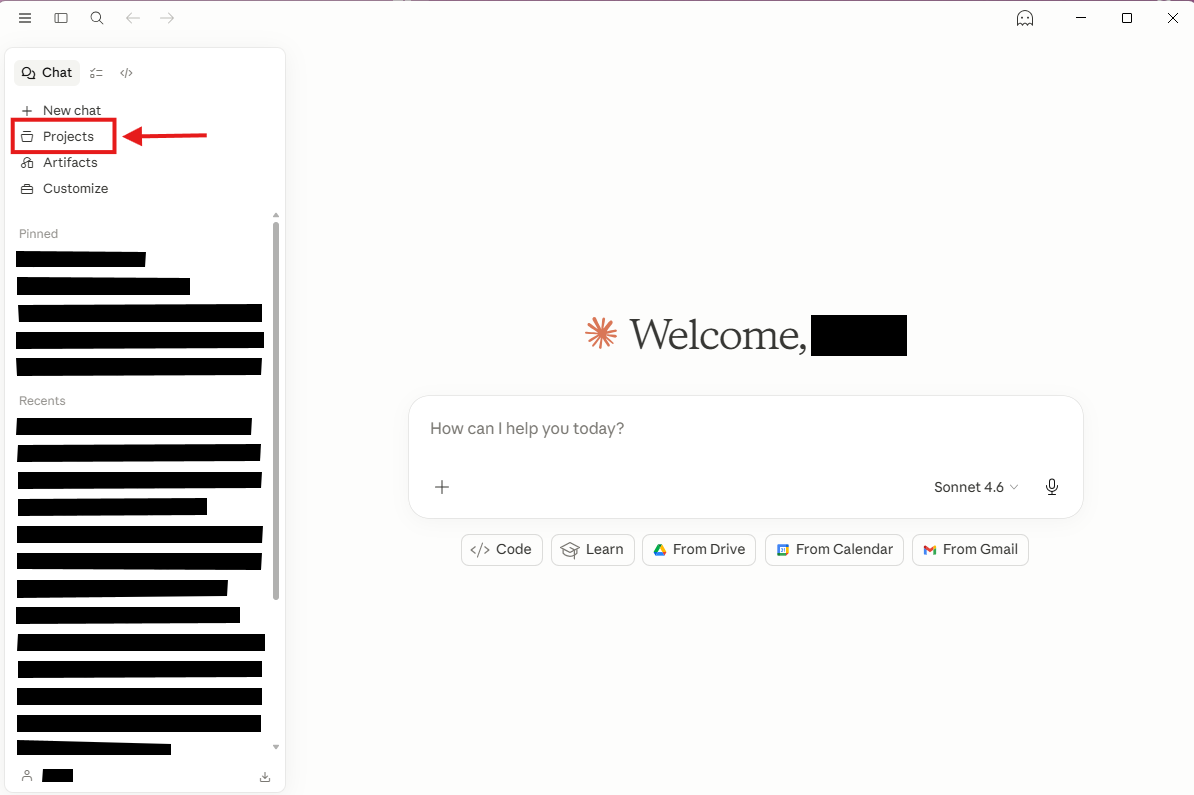
In Claude.ai, click "Projects" in the left sidebar and hit "New Project." Name it something functional — "[Your Business Name] Assistant" or "Business HQ." This is your dedicated workspace. Every conversation you start inside it inherits your knowledge base automatically. It's the difference between briefing a stranger every single time and picking up where you left off with a colleague who already knows your business.
2. Build your knowledge base with the documents Claude needs most
This is the core of the setup. Projects let you upload files that Claude can reference in any conversation — your permanent business context. Think of it like onboarding a new employee. What would they need to read in their first week to actually be useful?
Start with these:
- A one-page business overview — what you do, who you serve, how you price it
- Your brand voice guide — or just paste in two or three examples of content you like and a few sentences describing your tone
- Your FAQ or common client questions — with the answers you actually give
- Your services or product descriptions — the version you'd hand to a prospect
These don't need to be polished. A rough Google Doc you copy-paste as a text file works fine.
3. Write a Project prompt that tells Claude how to use that knowledge
The Project prompt is a persistent instruction set Claude reads at the start of every conversation. Keep it tight and specific — two focused paragraphs will outperform a sprawling page every time. Here's what one might look like for a solo bookkeeper:
You are a business assistant for a solo bookkeeping practice serving small e-commerce businesses. My clients typically have 1–10 employees and revenue under $2M. My tone is warm but direct — I don't use jargon, and I don't over-explain. When I ask you to draft something, give me two versions so I can choose. Never add disclaimers or caveats I didn't ask for. Reference my uploaded service descriptions and FAQ when they're relevant.
Notice what that prompt does: it tells Claude who the business serves, what the voice sounds like, and exactly how to behave. It's not describing the business in general — it's giving Claude operating instructions. That's the distinction that makes the difference.
4. Update as necessary
Treat your Project knowledge base as a living system. As your business changes your knowledge base should too. When you add a new service, update the doc. When you notice Claude getting your tone slightly wrong, add a clarifying example. The small business owners who get the most out of Claude aren't the ones who set it up perfectly on day one — they're the ones who keep refining it over time.
What this looks like in practice
Here's what this looks like across different types of businesses:
- A real estate agent uploads their bio, market area talking points, and listing templates. Now every listing description Claude drafts already reflects their market expertise and voice — no re-briefing required.
- A personal trainer uploads their coaching philosophy, program structure, and intake language. Claude drafts client check-in messages that match their method, not a generic fitness template.
- A solo consultant uploads their service menu, past proposals, and ideal client profile. Claude helps draft new proposals without ever asking "so what do you do again?"
- A restaurant owner uploads their menu, seasonal specials, and brand personality. Every Instagram caption and email promotion Claude writes is already on-brand and menu-accurate.
- A bookkeeper uploads their client roster with notes on each account. Claude drafts client-facing summaries and reminders specific to that client's situation — not a form letter.
The common thread: Claude isn't smarter in these cases. It's better informed. And better informed means better output.
The knowledge base you build today is an asset. Every email, proposal, and social post you run through it gets faster and more on-brand than the last one. You're not just making this week's work easier — you're building something that compounds.
Twenty minutes of setup. Weeks of better, personalized output.
Claude Projects are available on the free tier at Claude.ai — no paid plan required to get started.