Most small business owners I talk to have tried AI at least once. They've opened ChatGPT or Claude, typed something in, gotten a response that was fine but not great, and moved on.
AI is genuinely useful for small business owners — but only once you can look at your week and see the opportunities in it. That's a skill, and it's not obvious. This article is about building it, and then giving you a concrete 30-day plan to act on it.
First: Learn to See the Opportunities
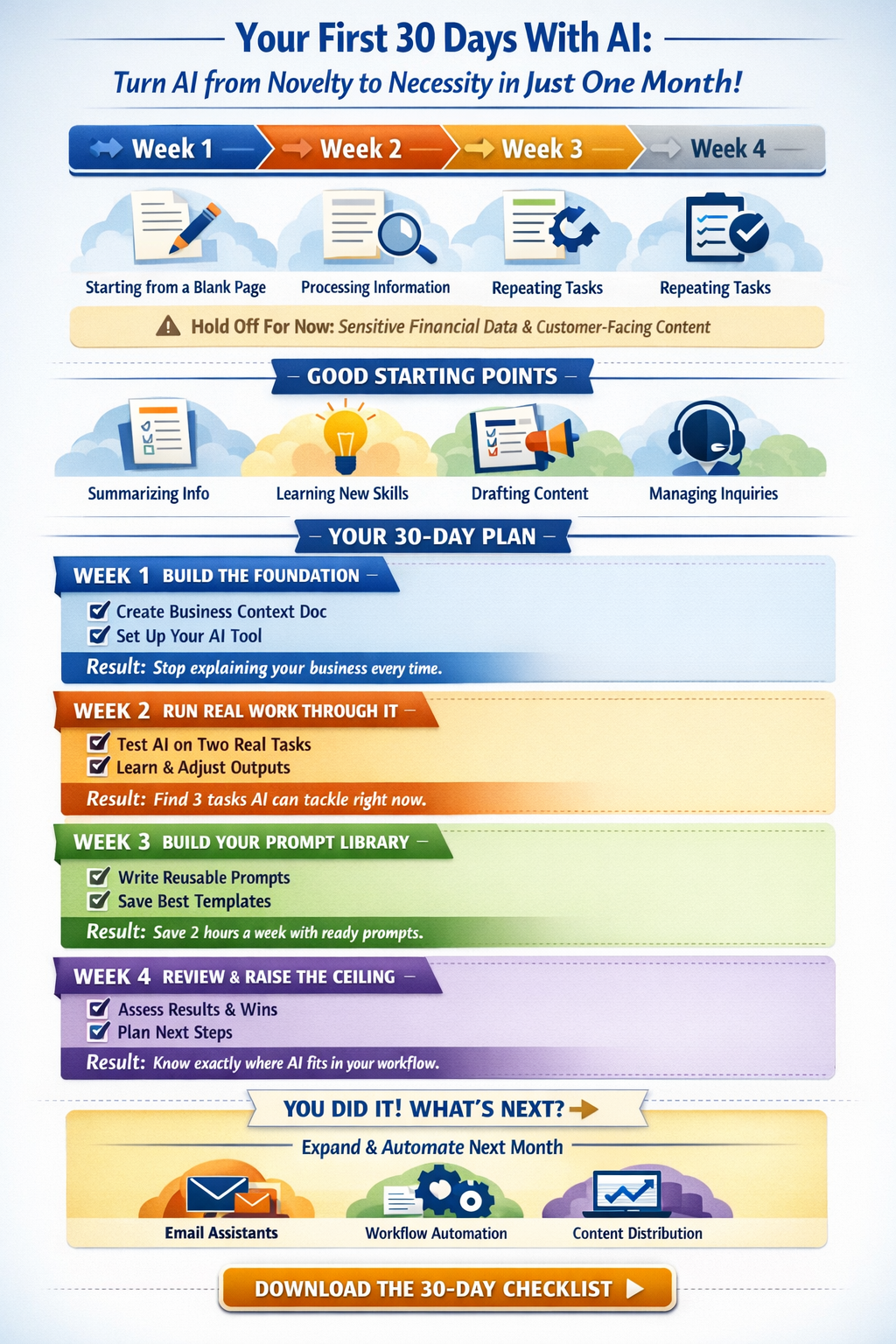
Before you open any AI tool, it helps to know what kinds of work AI is actually good at. Not everything belongs in the AI bucket — at least not yet. Here's a simple way to think about it.
AI works best when the task involves one or more of these:
- Starting from a blank page. Drafting an email, writing a social post, putting together a job posting. The blank page problem is where AI earns its keep fastest.
- Processing more information than is comfortable. A long email thread, a contract you need to understand quickly, a report you need the key points from. AI reads fast and summarizes well.
- Repeating a similar task over and over. If you've done something more than a few times and it follows a pattern, AI can probably help you do it faster.
What to hold off on for now: anything involving sensitive financial data, and anything customer-facing that would go out without you reviewing it first. Those use cases exist — they're just not where you want to start.
Good Starting Points for Most Small Businesses
Here are the areas where beginners consistently see results fastest:
Summarizing information. This is the easiest AI win available. Drop a long email thread, a vendor contract, or a meeting transcript into Claude and ask for the key points. Zero setup, immediate value. If you do nothing else in week one, do this.
Learning new things. This one is underrated. Small business owners are generalists by necessity — you're constantly figuring out things outside your core expertise. AI is an exceptional on-demand tutor. Ask it to explain a concept, walk you through an unfamiliar process, or help you understand something you've been avoiding. This alone changes how you approach problems.
Drafting marketing content. Blog posts, social captions, email newsletters — AI is a strong first-draft partner for all of it. Give it context about your business and your audience and it'll get you 70% of the way there. You edit, you publish. The time savings compound quickly if you're producing content regularly.
Managing support and inquiries. If you get similar questions repeatedly — from customers, clients, or vendors — AI can help you draft responses faster. Feed it the question and a few notes about your answer, and it produces a polished reply you can send with minor edits.
Drafting internal documents. SOPs, onboarding guides, job postings, policy documents. These are high-effort, one-time tasks that most small business owners put off indefinitely. AI compresses the time dramatically. This one works best once you have a bit of context set up, so think of it as a week three or four project.
Your 30-Day Plan
Week 1: Build the Foundation
Your goal this week isn't to save time. It's to set up the conditions that will save you time for the next year.
Write a business context document — a page or two covering what your business does, who your customers are, and how you like to communicate. Think of it as an onboarding document for a new assistant. Without it, every AI conversation starts from zero. With it, you stop explaining yourself and start getting useful output.
Load it into whatever AI tool you're using as a standing reference. If you're on Claude, creating a Project is the best way to do this — we wrote a step-by-step guide on exactly how to set that up here. The specific mechanism matters less than the habit: context in, better output out.
By the end of week one, you have a context document and a place for it.
Week 2: Run Real Work Through It
Pick two or three tasks from your actual week and run them through AI. Not hypothetical tasks — real ones. The follow-up email you need to send after a sales call. The social post that's been sitting in your drafts. The summary of that long document you've been avoiding.
Pay attention to where the output is close but not quite right, and what kind of adjustment fixes it. That feedback loop is how you get better at using the tool. The goal isn't perfect output on the first try. It's learning what kind of input produces what kind of result.
By the end of week two you'll know where AI is genuinely useful in your workflow and where it isn't. That clarity is worth more than any individual thing it produces.
Week 3: Build Your Prompt Library
Look back at week two and ask: which of these tasks do I do regularly? If AI helped you draft a client update in ten minutes instead of forty-five, and you send one every week, that's not a one-time win — that's a structural change to how you work.
For each task that worked, write a reusable prompt. A short template that captures the context and the ask. The best place to keep these is somewhere you'll actually use — a note inside your Claude Project works well since it's right there when you need it, but a simple Google Doc or Notion page works just as well. The system that's in front of you beats the perfect system you have to go looking for.
This prompt library is the manual version of something more powerful. As you get comfortable, these prompts become the building blocks for more structured automations — but for now, having them written down and reusable is enough.
By the end of week three you have two or three reusable prompts built around real work.
Week 4: Take Stock and Plan Month Two
You've spent three weeks building habits and running real work through AI. Week four is about making sure that work compounds.
Set aside an hour — ideally at the end of your week — and work through these questions:
What did I actually use AI for this month? Write it down. You may be surprised how much ground you covered, or you may notice you kept reaching for it in the same two or three situations. Both are useful data.
Where did it save me meaningful time? Not "a few minutes here and there" — where did it genuinely change the shape of a task? Those are the workflows worth locking in.
What did I try that didn't work, and why? Bad outputs are usually a prompt problem, not a tool problem. If something consistently came back wrong, think about what context was missing. That's fixable.
What am I still doing manually that follows a pattern? This is the most important question. Look at your week and find the tasks you haven't handed off to AI yet but probably could. Write them down. That list is your month two starting point.
By the end of this exercise you'll have a short inventory of workflows that are working, a few to fix, and a list of new candidates to test. That last list is what the next phase is built around — because month two is where you stop doing things manually and start connecting your tools so they work together automatically. More on that next time.
Use this printable checklist to track your progress through the month: Download the 30-Day AI Tracker (PDF)
What Comes Next
Thirty days gets you off the ground. Month two and three is where things get more interesting — connecting your tools so workflows run automatically, setting up an email assistant that handles common inquiries, automating content distribution, and tackling the more complex stuff like support queues and meeting workflows. We'll cover all of that in the next post.
If you'd rather skip the trial and error and get this set up properly from the start, that's exactly what we help small businesses do at Simply Insilico. Reach out and we'll map out where AI can make the biggest difference in your business.